Browser With Website Blocker for Mac: Your Options

Summarize with: ChatGPT · Perplexity · Claude · Grok
If you want a browser that blocks websites by itself, Browwwser is a Mac browser with the blocklist built in. Safari, Chrome, Firefox and Edge have no blocklist of their own, so they need Screen Time, an extension or a system policy. The right pick depends on whether you will switch browsers when you want a distraction.
What are the options on a Mac?
| Browser | How it blocks sites | Covers | Can you undo it quickly? | Cost |
|---|---|---|---|---|
| Safari | Screen Time, Limit Adult Websites › Restricted list (Apple) | Safari | Yes, unless a Screen Time passcode you don’t know is set | Free |
| Chrome | Extension (LeechBlock NG, BlockSite) or the URLBlocklist policy | Chrome | Extension: two clicks. Policy: needs admin rights | Free to paid |
| Firefox, Edge, Brave and other Chromium browsers | LeechBlock NG extension, which supports them | One browser | Extension page | Free |
| Browwwser | Built into the browser | Sites inside Browwwser; other browsers closed as apps | Lock mode: not without the recovery password | $99/year or $199 once, 7-day trial |
What can Safari do?
Safari has no blocker of its own. Apple’s Screen Time lets you add sites to a Restricted list under System Settings › Screen Time › Content & Privacy › App Store, Media, Web, & Games. It costs nothing and takes two minutes; the full steps are in how to block websites on Mac. The limit is that you can remove the site yourself in seconds, and every other browser on the Mac stays open.
What can Chrome, Edge, Firefox and Brave do?
All of them accept extensions, which are the quickest option and the easiest to remove. LeechBlock NG supports Firefox, Chrome, Edge and other Chromium browsers such as Brave, Opera and Vivaldi, and can protect its options with a password or random access code. Chrome adds the URLBlocklist policy, which is harder to undo but meant for managed setups; how to block websites on Chrome walks through it.
An extension blocks one browser. If you open Safari instead, the block doesn’t follow you.
What does a browser with blocking built in change?
Browwwser is a desktop browser for macOS 12 or later, built on Chromium. Blocking is part of the browser, so a blocked site doesn’t load and there is no extension to disable. It shows a plain blocked page with an attempt counter, with no countdown and no “continue anyway” button.
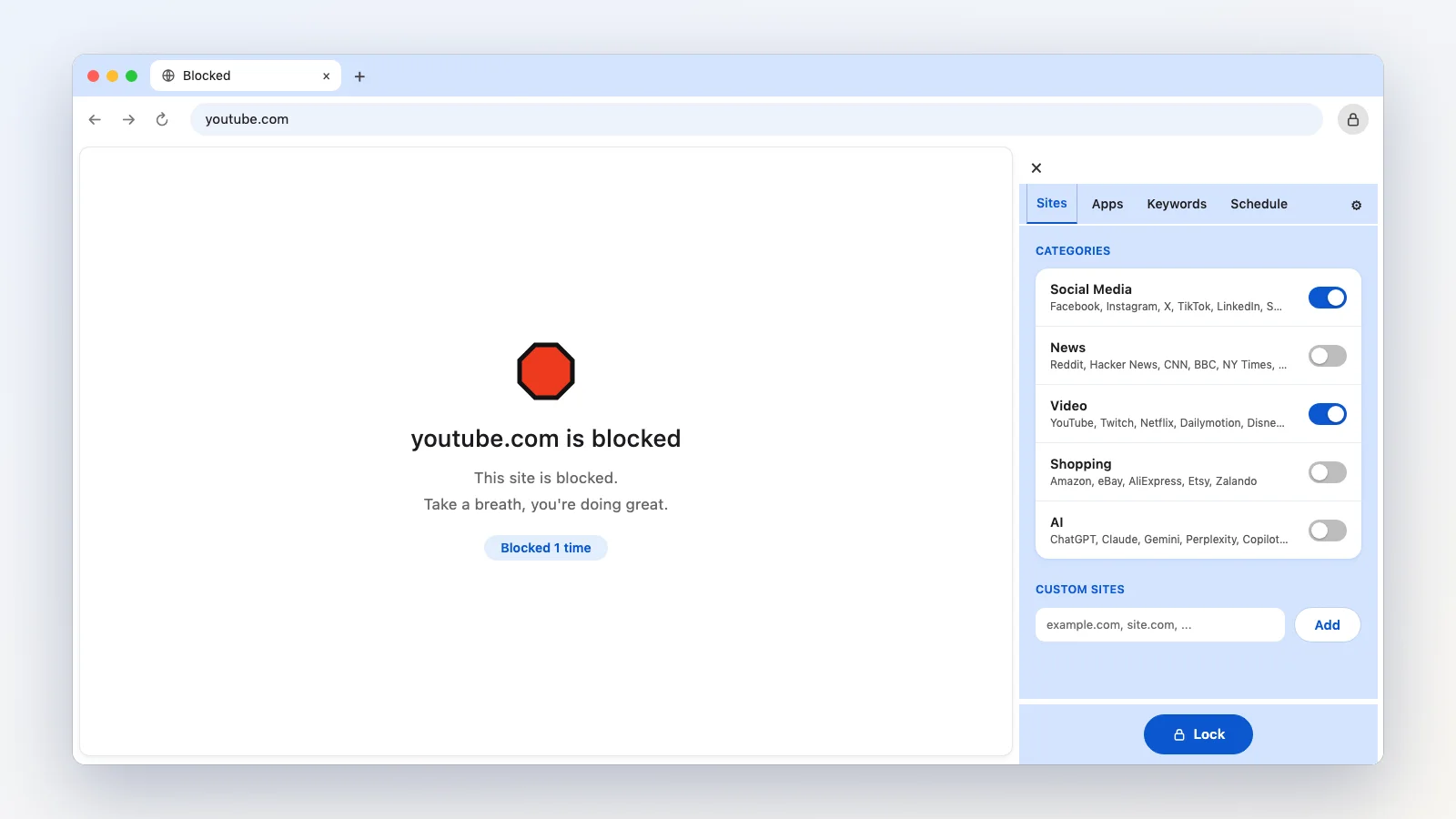
- Sites and apps. Add sites, or use one-click presets (social media, news, video, shopping, AI). Add macOS apps too, or block a group such as messaging, games, streaming or other browsers; blocked apps close while blocking is on.
- Schedule. A weekly day-by-hour grid.
- Lock mode. It locks the blocklist behind a recovery password you choose, with no unlock button and no timer. If you forget the password, support can send a one-time code within 24 hours.
- Chrome import. Bookmarks, passwords, history and extensions come across in one click, and Chrome extensions work in Browwwser.

The limits are real. It runs on Mac and Windows 10/11 (64-bit) only, with no Linux or mobile version. It costs $99 a year or $199 once after a 7-day trial, with a 14-day money-back guarantee (pricing). And website blocking applies only inside Browwwser: if Safari or Chrome stays installed, block them as apps or you’ll just open one of them.
How do you choose?
- You block yourself and keep opening other browsers: use something that covers the whole Mac, like SelfControl, Cold Turkey or Focus, or Browwwser with the other browsers blocked as apps. The best website blockers compares them.
- You can live in one browser: an extension is free and quick, and good enough if you only need a nudge.
- You need a locked block on a Mac and want one app: Browwwser or a system-wide blocker both work; try the 7-day trial or the free tiers.
- You need your phone covered: Browwwser doesn’t run on iPhone or Android. On Windows, Browwwser runs too; see best website blockers for Windows.
If your goal is broader than blocking, see the best focus apps for Mac.
Frequently asked questions
Is there a Mac browser with a built-in website blocker?
Browwwser is a Chromium-based macOS browser with website and app blocking built into the browser. Safari, Chrome, Firefox and Edge have no blocklist of their own; they rely on Screen Time, extensions or system policies.
Does Safari have a website blocker?
Not on its own. Apple's Screen Time lets you restrict websites in Safari under System Settings › Screen Time › Content & Privacy, but you can change that yourself unless a passcode you don't know protects it.
Can a browser blocker stop me from using other browsers?
Only if it blocks them as apps. Browwwser can close Safari, Chrome, Firefox, Arc, Edge, Opera, Brave and Vivaldi while blocking is on; a Chrome extension can't touch Safari.
Is a browser with a built-in blocker better than an extension?
It is harder to switch off, because there is no extension page to open. The trade-off is that you have to use that browser. A system-wide app covers every browser but is a separate purchase.
Does Browwwser work on Windows?
Yes. It runs on Windows 10 or 11 (64-bit) as well as macOS 12 or later.
A Mac browser that blocks distractions,
built for deep work.
A macOS browser that blocks distracting sites in its engine and closes distracting apps.
Try it free for 7 daysBrowwwser is a Mac browser with website and app blocking built in, scheduled blocks and a lock mode only your recovery password can lift. 7-day free trial.
Try it free for 7 days